
GcCalendarCell
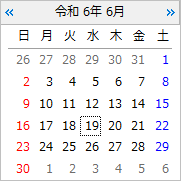
GcCalendarCellは、PlusPakのGcCalendarコントロールと同等の機能を提供します。GcCalendarCellを使用すると、グリッド内に日付を選択可能なカレンダーを表示できます。
機能
GcCalendarCellでは、次の機能を使用できます。
ヘッダ、曜日タイトル、日付領域、週番号、選択した日付、隣接日、休日、曜日のスタイルのカスタマイズ
月間カレンダー
年間カレンダー
週の開始曜日
和暦の表示
六曜の表示と取得
休日・祝日の設定
各機能の詳細はGcCalendarCellクラスのリファレンスを参照してください。
データ型
GcCalendarCellはObject型の値を保持します。この型はGcCalendarCell.ValueTypeプロパティで確認できます。
入力と表示には、Date型(C#ではSystem.DateTime型)にキャストした値が使用されます。この型はGcCalendarCell.FormattedValueTypeプロパティで確認できます。セルに値が読み出される場合の動作を変更するには、GcCalendarCell.OnCellFormattingメソッドをオーバーライドします。セルから値が書き戻される場合の動作を変更するには、GcCalendarCell.OnCellParsingメソッドをオーバーライドします。
セル編集コントロール
GcCalendarCellの値はGcCalendarEditingControlコントロールで編集できます。このコントロールはIEditingControlインタフェースとPlusPakの GrapeCity.Win.Calendar.GcCalendarクラスを継承しています。セル編集コントロールの型はGcCalendarCell.EditTypeプロパティで確認できます。
スタイル
GcCalendarCellはCellStyleクラスの次のメンバをサポートしています。セルのスタイルはCell.Styleプロパティで設定します。
CellStyle メンバ | 非編集時 | 編集時 |
|---|---|---|
BackColor | 有効 | 有効 |
BackgroundGradientEffect | 有効 | - |
Border | 有効 | 有効 |
DataSourceNullValue | 有効 | 有効 |
DisabledBackColor | 有効 | 有効 |
DisabledForeColor | 有効 | 有効 |
DisabledGradientEffect | 有効 | - |
EditingBackColor | - | 有効 |
EditingForeColor | - | - |
Font | 有効 | 有効 |
ForeColor | - | - |
Format | - | - |
FormatProvider | - | - |
Image | - | - |
ImageAlign | - | - |
ImeMode | - | - |
ImeSentenceMode | - | - |
InputScope | - | - |
LineAdjustment | - | - |
Margin | 有効 | 有効 |
MouseOverBackColor | 有効 | - |
MouseOverForeColor | - | - |
MouseOverGradientEffect | 有効 | - |
Multiline | - | - |
NullValue | 有効 | 有効 |
Padding | 有効 | 有効 |
PatternColor | 有効 | - |
PatternStyle | 有効 | - |
SelectionBackColor | 有効 | - |
SelectionForeColor | 有効 | - |
SelectionGradientEffect | 有効 | - |
Tag | 有効 | 有効 |
TextAdjustment | - | - |
TextAlign | - | - |
TextAngle | - | - |
TextEffect | - | - |
TextImageRelation | - | - |
TextIndent | - | - |
TextVertical | - | - |
UseCompatibleTextRendering | - | - |
WordWrap | - | - |
ショートカットキー
次の表はGcCalendarCellの編集時に処理されるキーとGcMultiRowコントロールで処理されるキーの一覧です。
修飾子 | キー | GcCalendarCell | GcMultiRow |
|---|---|---|---|
なし | Keys.PageUp | 有効 | - |
Keys.PageDown | 有効 | - | |
Keys.End | 有効 | - | |
Keys.Home | 有効 | - | |
Keys.Left | 有効 | - | |
Keys.Right | 有効 | - | |
Keys.Up | 有効 | - | |
Keys.Down | 有効 | - | |
Keys.Space | 有効 | - | |
Keys.Control | Keys.PageUp | 有効 | - |
Keys.PageDown | 有効 | - | |
Keys.Home | 有効 | - | |
Keys.End | 有効 | - |
イベント
セルの内容領域のクリックに対応した処理を実装するには、GcMultiRow.CellContentClickイベントを使用します。ダブルクリックの場合はGcMultiRow.CellContentDoubleClickイベントです。
セルの値が変更されたときの処理を実装するには、GcMultiRow.CellEditedFormattedValueChangedイベントを使用します。
GcCalendarCellを編集中のイベントに対応した処理は、GcCalendarEditingControlクラスのイベントを使用します。
PlusPakコントロールとの比較
次の表はGcCalendarCellとPlusPakのGcCalendarコントロールの主要なプロパティの比較です。
GcCalendarCell | GcCalendar |
|---|---|
ActiveHolidayStyles | ActiveHolidayStyles |
AllowSelection | AllowSelection |
Style.BackColor | BackColor |
なし | BackgroundImage |
なし | BackgroundImageLayout |
Style.Border | BorderStyle |
CalendarDimensions | CalendarDimensions |
CalendarMargins | CalendarMargins |
CalendarType | CalendarType |
CalendarYear | CalendarYear |
ControlStyle | ControlStyle |
EmptyRows | EmptyRows |
FirstDayOfWeek | FirstDayOfWeek |
FirstFiscalMonth | FirstFiscalMonth |
FirstMonthlnView | FirstMonthlnView |
FlatStyle | FlatStyle |
なし | FocusDate |
FocusRectangle | FocusRectangle |
Style.Font | Font |
HeaderFormat | HeaderFormat |
HeaderHeight | HeaderHeight |
HeaderStyle | HeaderStyle |
HolidayStyles | HolidayStyles |
InnerMargins | InnerMargins |
InnerSpace | InnerSpace |
ItemStyle | ItemStyle |
LegendStyle | LegendStyle |
Lines | Lines |
MaxDate | MaxDate |
なし | MaxSelectionCount |
MinDate | MinDate |
なし | NavigatorOrientation |
なし | OverrideTipText |
なし | Redraw |
RokuyouAlignment | RokuyouAlignment |
RokuyouFontScale | RokuyouFontScale |
Value | SelectedDate |
なし | SelectionMode |
なし | Selections |
SelectionStyle | SelectionStyle |
なし | Shortcuts |
ContextMenuStrip | ShowContextMenu |
ShowHeader | ShowHeader |
ShowNavigator(未対応) | ShowNavigator |
ShowRokuyou | ShowRokuyou |
ScrollRate | ScrollRate |
なし | ScrollTipAlign |
なし | ShowScrollTip |
ShowToday | ShowToday |
ShowTodayMark | ShowTodayMark |
ShowTraliling | ShowTraliling |
ShowWeekNumber | ShowWeekNumber |
ShowZoomButton | ShowZoomButton |
Style.Border | SingleBorderColor |
なし | Styles |
なし | SubStyles |
TitleStyle | TitleStyle |
なし | TipInterval |
TodayImage | TodayImage |
TodayMarkColor | TodayMarkColor |
TrailingStyle | TrailingStyle |
UseControlStyle | UseControlStyle |
UseHeaderFormat | UseHeaderFormat |
Weekdays | Weekdays |
WeekNumberSelect | WeekNumberSelect |
WeekNumberStyle | WeekNumberStyle |
WeekTitleSelect | WeekTitleSelect |
YearMonthFormat | YearMonthFormat |
GcCalendarCellの利用
ここでは、GcCalendarCellの利用方法について、以下の項目に分けて解説しています。