
GcColorPickerCell
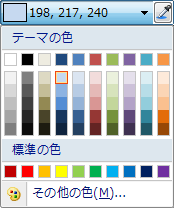
GcColorPickerCellは、PlusPakのGcColorPickerコントロールと同等の機能を提供します。GcColorPickerCellを使用すると、色の選択機能を簡単に実装できます。
機能
GcColorPickerCellでは、次の機能を使用できます。
テーマカラー
最近使用した色
画面上の任意の色をマウスポインタで取得
各機能の詳細はGcColorPickerCellクラスのリファレンスを参照してください。
データ型
GcColorPickerCellはObject型の値を保持します。この型はGcColorPickerCell.ValueTypeプロパティで確認できます。
入力と表示には、System.Drawing.Color型にキャストした値が使用されます。この型はGcColorPickerCell.FormattedValueTypeプロパティで確認できます。セルに値が読み出される場合の動作を変更するには、GcColorPickerCell.OnCellFormattingメソッドをオーバーライドします。セルから値が書き戻される場合の動作を変更するには、GcColorPickerCell.OnCellParsingメソッドをオーバーライドします。
セル編集コントロール
GcFontPickerCellの値はGcColorPickerEditingControlコントロールで編集できます。このコントロールはIEditingControlインタフェースとPlusPakのGrapeCity.Win.Pickers.GcColorPickerクラスを継承しています。セル編集コントロールの型はGcFontPickerCell.EditTypeプロパティで確認できます。
スタイル
GcColorPickerCellはCellStyleクラスの次のメンバをサポートしています。セルのスタイルはCell.Styleプロパティで設定します。
CellStyle メンバ | 非編集時 | 編集時 |
|---|---|---|
BackColor | 有効 | 有効 |
BackgroundGradientEffect | 有効 | - |
Border | 有効 | 有効 |
DataSourceNullValue | 有効 | 有効 |
DisabledBackColor | 有効 | - |
DisabledForeColor | 有効 | - |
DisabledGradientEffect | 有効 | - |
EditingBackColor | - | 有効 |
EditingForeColor | - | 有効 |
Font | 有効 | 有効 |
ForeColor | 有効 | 有効 |
Format | - | - |
FormatProvider | - | - |
Image | - | - |
ImageAlign | - | - |
ImeMode | 有効 | 有効 |
ImeSentenceMode | 有効 | 有効 |
InputScope | 有効 | 有効 |
LineAdjustment | - | - |
Margin | 有効 | 有効 |
MouseOverBackColor | 有効 | - |
MouseOverForeColor | 有効 | - |
MouseOverGradientEffect | 有効 | - |
Multiline | - | - |
NullValue | 有効 | 有効 |
Padding | 有効 | 有効 |
PatternColor | 有効 | - |
PatternStyle | 有効 | - |
SelectionBackColor | 有効 | - |
SelectionForeColor | 有効 | - |
SelectionGradientEffect | 有効 | - |
Tag | 有効 | 有効 |
TextAdjustment | - | - |
TextAlign | 有効 | 有効 |
TextAngle | - | - |
TextEffect | - | - |
TextImageRelation | - | - |
TextIndent | - | - |
TextVertical | - | - |
UseCompatibleTextRendering | - | - |
WordWrap | - | - |
ショートカットキー
次の表はGcColorPickerCellの編集時に処理されるキーとGcMultiRowコントロールで処理されるキーの一覧です。
修飾子 | キー | GcColorPickerCell | GcMultiRow |
|---|---|---|---|
なし | Keys.PageUp | - | - |
Keys.PageDown | - | - | |
Keys.End | 有効 | - | |
Keys.Home | 有効 | - | |
Keys.Left | 有効 | - | |
Keys.Right | 有効 | - | |
Keys.Up | 有効 | - | |
Keys.Down | 有効 | - | |
Keys.Insert | - | - | |
Keys.Delete | 有効 | - | |
Keys.BackSpace | - | - | |
Keys.F4 | 有効 | - | |
Keys.Tab | - | - | |
Keys.Control | Keys.End | - | 有効 |
Keys.Home | - | 有効 | |
Keys.Left | 有効 | - | |
Keys.Right | 有効 | - | |
Keys.Up | - | 有効 | |
Keys.Down | - | 有効 | |
Keys.A | 有効 | - | |
Keys.C | 有効 | - | |
Keys.V | 有効 | - | |
Keys.X | 有効 | - | |
Keys.Shift | Keys.Left | 有効 | - |
Keys.Right | 有効 | - | |
Keys.Up | 有効 | - | |
Keys.Down | 有効 | - | |
Keys.Home | 有効 | - | |
Keys.End | 有効 | - | |
Keys.Tab | 有効 | - | |
Keys.F10 | 有効 | - | |
Keys.Alt | Keys.Up | 有効 | - |
Keys.Down | 有効 | 有効 |
Keys.Control+Keys.Cは複数のセルが選択されている場合はGcMultiRowコントロールによって処理されます。
イベント
セルの内容領域のクリックに対応した処理を実装するには、GcMultiRow.CellContentClickイベントを使用します。ダブルクリックの場合はGcMultiRow.CellContentDoubleClickイベントです。
セルの値が変更されたときの処理を実装するには、GcMultiRow.CellEditedFormattedValueChangedイベントを使用します。
GcColorPickerCellを編集中のイベントに対応した処理は、GcColorPickerEditingControlクラスのイベントを使用します。
PlusPakコントロールとの比較
次の表はGcColorPickerCellとPlusPakのGcColorPickerコントロールの主要なプロパティの比較です。
GcColorPickerCell | GcColorPicker |
|---|---|
AutomaticColor | AutomaticColor |
AutomaticColorText | AutomaticColorText |
Style.BackColor | BackColor |
なし | BackgroundImage |
なし | BackgroundImageLayout |
Style.Border | BorderStyle |
Style.DisabledBackColor | DisabledBackColor |
Style.DisabledForeColor | DisabledForeColor |
DropDownSettings | DropDownSettings |
DropDownSettings.AutoDropDown | DropDownSettings.AutoDropDown |
DropDownSettings.ClosingAnimation | DropDownSettings.ClosingAnimation |
DropDownSettings.ContextMenu | DropDownSettings.ContextMenu |
DropDownSettings.DropDownDirection | DropDownSettings.DropDownDirection |
DropDownSettings.OpeningAnimation | DropDownSettings.OpeningAnimation |
DropDownSettings.ShowShadow | DropDownSettings.ShowShadow |
DropDownStyle | DropDownStyle |
FlatStyle Office2007Style | FlatStyle |
Style.Font | Font |
Style.ForeColor | ForeColor |
なし | HideSelection |
HighlightText | HighlightText |
MaximumSize | MaximumSize |
MinimumSize | MinimumSize |
MoreColorsText | MoreColorsText |
NoFillColor | NoFillColor |
NoFillColorText | NoFillColorText |
ContentPadding | Padding |
RecentlyUsedColorsCount | RecentlyUsedColorsCount |
RecentlyUsedColorsText | RecentlyUsedColorsText |
Value | SelectedColor |
ShowAutomaticeColor | ShowAutomaticeColor |
ShowColorBox | ShowColorBox |
ShowMoreColors | ShowMoreColors |
ShowNoFillColor | ShowNoFillColor |
ShowRecentlyUsedColors | ShowRecentlyUsedColors |
ShowStandardColors | ShowStandardColors |
ShowThemeColors | ShowThemeColors |
ShowToolTips | ShowToolTips |
SideButtons | SideButtons |
Style.Border | SingleBorderColor |
StandardColors | StandardColors |
StandardColorsText | StandardColorsText |
Style.TextAlign | TextAlign |
ThemeColors | ThemeColors |
ThemeColorsText | ThemeColorsText |
UseColorName | UseColorName |
GcColorPickerCell の利用
ここでは、GcColorPickerCellの利用方法について、以下の項目に分けて解説しています。
色の設定と取得
外観の設定
ドロップダウンダイアログの設定